
We've completely rebuilt how Gridio understands electricity pricing – so your charging costs finally reflect what you actually pay. No more approximations. No more hidden fees. Just real numbers that match your real bill.
.png)
WHAT'S NEW
Your tariff, your way
Whether you're on dynamic spot pricing or manual rates, Gridio now supports both:
- Select your price region for automatic spot price updates
- Or manually configure your rates for complete control
The complete cost picture
Electricity isn't just about the energy price. Now you can include:
- Grid and distribution fees (including time-based tariffs)
- Supplier markups
- Taxes and VAT
So the charging cost you see in Gridio matches the bill you receive.
This is especially powerful for time-based grid fees. If your grid operator charges higher fees during peak evening hours (common in many European markets), Gridio's smart charging now takes these into account – automatically avoiding expensive periods and maximizing your savings.
Example: Your spot price shows €0.20/kWh. But after grid fees (€0.05), supplier markup (€0.02), and 25% VAT, you're actually paying €0.34/kWh. That's a 70% difference and that's what Gridio now shows you.
See exactly where your money goes
Our new price breakdown stacks everything together visually:
- Energy price
- Grid fees
- Additional charges
- VAT
Toggle each layer on and off to understand exactly what you're paying and why.
Weekday & weekend pricing
Some tariffs charge differently depending on the day. You can now:
- Set separate weekday and weekend rates
- Define precise schedules using our visual time wheel
- Ensure calculations stay accurate all week long
Smart validation means no gaps, no overlaps, just accurate pricing around the clock.
WHY THIS MATTERS
Until now, understanding your true charging cost meant living with approximations.
But electricity pricing is messy:
- Spot prices that change every hour
- Fixed contracts with hidden markups
- Grid and distribution fees
- Taxes layered on top
Most apps ignore half of this, which means the "cost" they show isn't what you actually pay.
Custom Tariffs change that.
You tell Gridio how your electricity is priced. Gridio does the rest.
SETTING IT UP IS SIMPLE
Follow these steps to configure your real tariff:
1. Enable Custom Tariffs from your home screen or Settings → Price Settings
2. Select your country – we handle currency and tax rules automatically
3. Choose your tariff type – Dynamic for live spot prices or Manual for fixed rates
4. Add your complete costs – energy price, grid fees, supplier markups, and VAT
5. Set your rate schedule – same all week or different weekdays and weekend rates
6. Define time-based rates – use the visual time wheel to set different prices throughout the day
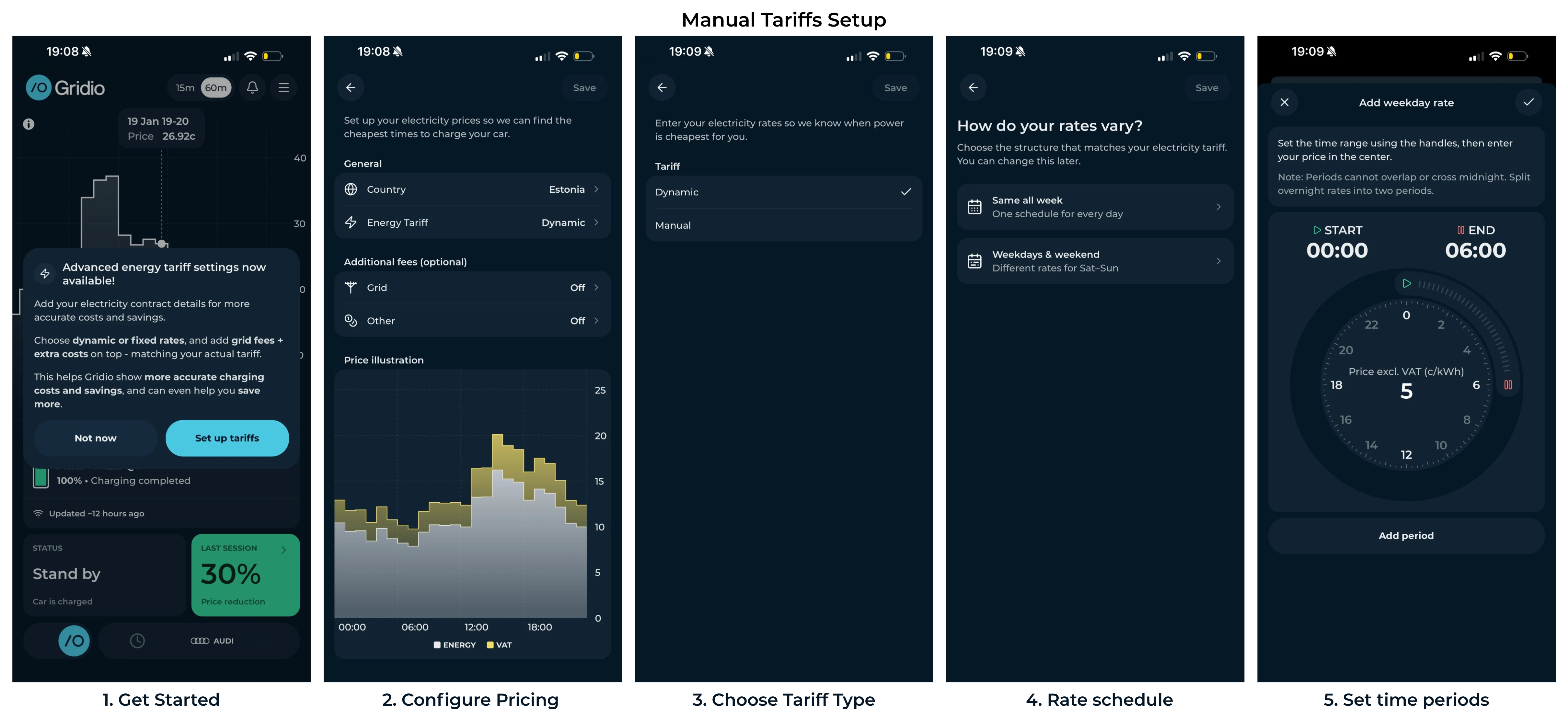
The visual time wheel makes it easy to define when different rates apply, and smart validation ensures there are no gaps or overlaps.
Setup takes less than 2 minutes. Once configured, Gridio automatically calculates all your charging costs using your real electricity price — no more guessing.
What you gain: Better data, better decisions
When Gridio knows your true electricity costs, everything improves:
- Accurate charging costs – no more guessing, no more surprises
- Real savings tracking – see exactly what smart charging saves you each month
- Smarter timing – identify the cheapest hours to charge based on your actual tariff
This is the foundation for smarter automation and bigger savings.
AVAILABLE NOW
The new Custom Tariff system is live in the latest version of Gridio.
GET STARTED:
- Update to the latest version of Gridio
- Head to Price Settings in the app
- Set up your tariff and start seeing real numbers
Questions? We're always here to help.
Happy charging,
The Gridio Team ⚡

